10 Dashes Procreate Brushes: Streamlining Your Digital Art Workflow
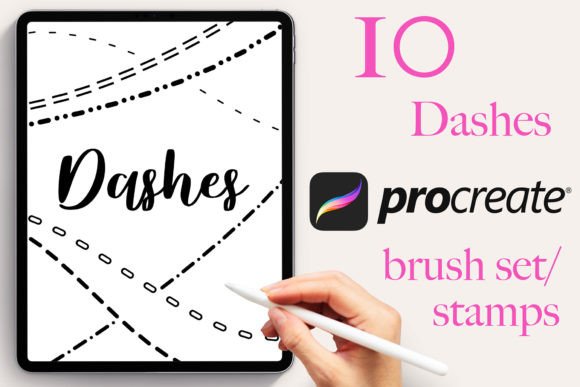
In the realm of digital illustration and graphic design, efficiency is often the difference between a finished project and an abandoned sketch. For professionals using the Apple iPad, the 10 Dashes Procreate Brushes set offers a specialized toolkit designed to accelerate specific creative tasks without compromising on aesthetic quality. This collection is not merely a bundle of random textures; it is a curated resource containing ten distinct dash designs, engineered to function as stamps within the Procreate application. Whether you are a marketer creating social media assets, an educator designing lesson plans, or a freelance illustrator working on editorial layouts, understanding how to integrate these tools into your broader workflow can significantly reduce production time.
The Role of Dash Stamps in Professional Design Processes
Before diving into technical implementation, it is essential to understand where dashed lines fit into a standard design process. In professional workflows, dashed lines serve multiple functional roles: they indicate hidden geometry, create visual separation, guide the eye through a composition, or add decorative texture that implies movement or incompleteness. The 10 Dashes Procreate Brushes set addresses these needs by providing pre-made, hand-drawn stamp variations. Unlike drawing a dashed line manually with a standard brush—which requires steady rhythm and precise spacing—these brushes allow for instant placement of consistent patterns.
This toolset fits seamlessly into the "execution" phase of a project. When you have completed your initial sketching and are moving into the detailing or layout stage, consistency becomes paramount. Using a manual method to draw twenty identical dashed borders across different pages of a presentation or a series of illustrations is inefficient and prone to human error. By utilizing this brush set, you ensure that every dash maintains the same weight, length, and character, which is critical for maintaining brand identity or stylistic coherence across large projects.
Integration Before and During Project Execution
Effective use of the 10 Dashes Procreate Brushes begins before the actual drawing starts. Preparation involves organizing your canvas and understanding the limitations and capabilities of the asset. Since this set is exclusively designed for the Procreate App on Apple iPad, it is vital to verify your environment before purchasing or downloading. These files will not transfer to desktop software like Adobe Illustrator or other mobile apps. Recognizing this compatibility constraint early prevents workflow interruptions later.
Once imported, the brushes interact directly with your existing layer structure. Because they function as stamps, they are ideal for overlaying on top of complex backgrounds without interfering with underlying vector paths or raster paintings. This non-destructive approach allows you to experiment freely. You can place a dashed border around a product photo, add a dotted guideline for text alignment, or create a decorative frame for a logo, knowing that you can easily adjust the opacity or color of the stamp without redrawing it.
During the active creation phase, the lack of pressure sensitivity in these brushes becomes a feature rather than a bug. While many artists rely on pressure data for dynamic strokes, dash patterns require uniformity. A variable-width dash line can look messy or unintentional in a technical diagram or a clean UI mockup. The 10 Dashes Procreate Brushes provide a fixed stroke width that remains consistent regardless of how hard you press. This makes them compatible with any input method, including the Apple Pencil, third-party styluses, or even your finger, ensuring accessibility for users who may not own the latest hardware.
Practical Implementation Strategies for Different User Groups
The versatility of this brush set extends across various professional disciplines. Each user group can adapt the ten included designs to solve specific problems within their unique workflow.
- Freelance Illustrators and Artists: Use the variety of dash designs to create depth and texture in background elements. Instead of filling a space with a solid color, a subtle pattern of dashes can suggest atmosphere or distance. The ability to change the color and size of each brush allows for quick iteration when matching a client's color palette.
- Marketers and Social Media Managers: Efficiency is key when producing high volumes of content. These brushes can be used to create engaging story frames, highlight important text in promotional graphics, or design custom dividers for infographics. The instant download nature of the file means you can acquire the asset and begin production immediately.
- Educators and Content Creators: In instructional materials, clarity is essential. Dashed lines are frequently used to show folding instructions, cutting lines, or connecting related concepts in mind maps. The 10 Dashes Procreate Brushes allow educators to create professional-looking worksheets and digital presentations quickly, saving hours of manual drawing time.
- Small Business Owners: For those managing their own branding, consistency is vital. Using a standardized set of dashes ensures that all marketing collateral, from business cards to website banners, shares a cohesive visual language. This level of detail contributes to a perception of professionalism and attention to quality.
Optimizing Usability and Organization
To maximize the utility of the 10 Dashes Procreate Brushes, organization within the Procreate interface is crucial. Upon importing the single brush set file, you will find all ten varieties available at once. It is advisable to rename these brushes according to your personal naming convention or the specific project you are working on. For example, labeling them "Dash-Short," "Dash-Long," or "Dash-Curve" can help you locate the right tool instantly during a tight deadline.
Furthermore, leveraging the adjustable properties of the brushes enhances their flexibility. Although the core shape of the dash is fixed, you retain full control over the stroke size, color, and opacity. This means one brush can serve multiple purposes. A small, low-opacity dash might work perfectly for a subtle grid background, while increasing the size and opacity of the same brush transforms it into a bold, primary border. This adaptability reduces the need to purchase additional assets, making the 10 Dashes Procreate Brushes a cost-effective solution for expanding your digital toolkit.
Quality Control and Long-Term Asset Management
When incorporating third-party assets into a professional workflow, quality control is a necessary step. Since all designs in this set are hand-drawn specifically for Procreate, they possess a natural, organic feel that distinguishes them from rigid, computer-generated vectors. However, it is important to test the brushes at different zoom levels to ensure they render cleanly on your intended output medium. High-resolution exports should be checked to confirm that the edges of the dashes remain crisp and do not exhibit unwanted pixelation or blurring.
Long-term use of these brushes depends on how well they integrate into your master library. As you complete more projects, you will likely develop a preference for certain dash styles over others. Keeping the original brush set file backed up is recommended, as re-importing is a quick process if your device is reset or if you switch iPads. Remember that because these are exclusive to the Procreate ecosystem, they represent a dedicated investment in your iPad-based creative pipeline.
Workflow Optimization Through Instant Access
The "Instant Download" aspect of the 10 Dashes Procreate Brushes is a significant advantage for time-sensitive projects. In a fast-paced business environment, waiting for shipping or dealing with complex installation procedures can stall progress. With a direct digital delivery, you can move from decision to execution in minutes. This immediacy supports agile workflows where rapid prototyping and quick turnarounds are required.
Moreover, the simplicity of the asset—containing exactly ten distinct designs—prevents decision paralysis. Many brush packs offer hundreds of options, which can overwhelm users and slow down the creative process. A focused set of ten high-quality, varied designs encourages experimentation without cluttering your workspace. You can quickly cycle through the options to find the perfect match for your current task, then lock in your choice and proceed with confidence.
Conclusion: Enhancing Efficiency Without Sacrificing Quality
The 10 Dashes Procreate Brushes set represents a practical solution for designers, creators, and professionals who value both speed and precision. By automating the repetitive task of drawing dashed lines, these tools free up mental energy for higher-level creative decisions. Whether you are refining a logo, illustrating a children's book, or preparing a corporate report, the ability to apply consistent, hand-drawn textures instantly adds a layer of polish to your work.
Ultimately, the value of this resource lies in its seamless integration into the Procreate workflow. It respects the constraints of the platform while maximizing the potential of the Apple iPad as a standalone creative powerhouse. By adopting these brushes, you are not just adding a few new tools to your palette; you are optimizing your entire production process, ensuring that your final outputs are consistent, professional, and ready for immediate deployment.