25 Square Patterns Procreate Brushes: A Practical Guide for Digital Artists
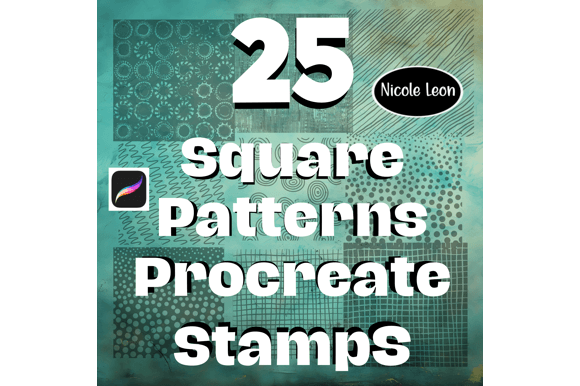
The 25 Square Patterns Procreate Brushes set offers digital artists a unique toolkit for creating textured, pattern-based designs directly within the Procreate app. Designed for iPad users with an Apple Pencil, this brushset delivers a collection of 25 distinct square-based patterns that can be customized in color, opacity, and scale. Unlike generic brushes, these are hand-drawn stamps that retain a natural, organic look while maintaining the geometric precision of square shapes. This makes them especially useful for illustrators, designers, and hobbyists who want to add depth and character to their work without relying on repetitive vector patterns.
What Sets 25 Square Patterns Procreate Brushes Apart
At their core, these brushes provide a hybrid between traditional brush tools and texture stamps. Each of the 25 patterns is designed to function as a stamp-style brush within Procreate, allowing for seamless integration into the app’s existing brush engine. This means users can adjust pressure sensitivity, opacity, and blending modes just like with any other brush. What distinguishes them from other pattern brushes is their hand-drawn aesthetic—each pattern is crafted to mimic real-world textures such as crosshatching, dot grids, and woven fabrics, but within a consistent square layout.
Because they’re delivered in the native .brushset format, installation is straightforward for Procreate users. There’s no need for external texture overlays or layer styles—everything is embedded directly into the brush behavior. This streamlined workflow makes the 25 Square Patterns Procreate Brushes a practical option for artists who want to maintain a non-destructive, editable process without constantly switching between tools or importing external assets.
Comparing Square Patterns to Other Procreate Brush Options
When evaluating digital brush tools for Procreate, users often choose between texture brushes, stamp brushes, and pattern overlays. The 25 Square Patterns Procreate Brushes fall into the stamp category but function more like pattern brushes due to their repeatable, tileable nature. Compared to texture brushes—which often apply a single background texture across a layer—these square-based stamps allow for more intentional placement and layering.
Other popular brushsets may include organic shapes like circles or abstract splatters, but the square format offers a structured approach that’s particularly useful for architectural sketches, technical illustrations, or grid-based designs. For example, an artist working on a cityscape might use one of the square pattern brushes to simulate brickwork or concrete textures without needing to manually draw each line or import a photo-based texture.
Strengths and Limitations of Square-Based Stamps
One of the key strengths of the 25 Square Patterns Procreate Brushes is their versatility within a defined shape. Because each brush is based on a square unit, they align well with grid systems and can be layered to build complex textures. This makes them ideal for users who work with digital sketchbooks, urban design concepts, or infographics where consistency and clarity are essential.
- Pros:
- Hand-drawn textures with a geometric structure
- Full compatibility with Procreate’s brush engine (opacity, pressure control, etc.)
- Easy to install and use directly within the app
- Customizable in real-time with any color or blending mode
- Cons:
- Less suitable for organic or flowing textures (e.g., watercolor washes)
- Limited to square-based patterns only
- May require practice to layer effectively for complex designs
When These Brushes Excel
The 25 Square Patterns Procreate Brushes are particularly effective in design scenarios where structure and repetition play a key role. They are well-suited for:
- Technical Illustration: Adding consistent textures to schematics, blueprints, or instructional diagrams.
- Urban Sketching: Creating textures for buildings, pavement, or tiled surfaces with a natural look.
- Graphic Design: Enhancing digital layouts with subtle background patterns or texture overlays.
- Pattern Design: Building repeatable motifs for fabric, wallpaper, or web design elements.
For example, a freelance illustrator working on a children’s book might use these brushes to create stylized textures for clothing or backgrounds, ensuring consistency across multiple pages. Similarly, a product designer could apply these brushes to mock up surface finishes on digital prototypes without needing to import external textures.
When to Consider Alternatives
While the 25 Square Patterns Procreate Brushes offer a unique value proposition, they may not be the best fit for every project. Artists focused on natural media simulation—such as oil painting, ink washes, or charcoal sketches—may find more suitable options in other brushsets designed for expressive, fluid strokes. Similarly, users who rely heavily on photo-based textures or vector-style pattern fills may prefer to use Procreate’s layer blending tools or third-party texture packs.
Another consideration is artistic style. Those who prefer loose, abstract, or freeform designs may find the square format too restrictive. In such cases, exploring circular or irregular stamp brushes could provide more flexibility. It’s also worth noting that while these brushes are highly customizable, they still require a level of manual control and artistic judgment to use effectively—there’s no automated pattern tiling or smart brush behavior built in.
Practical Tips for Getting the Most from These Brushes
To make the most of the 25 Square Patterns Procreate Brushes, consider the following techniques:
- Layer with blending modes: Try using Multiply or Overlay blending modes to integrate textures more naturally into line art or color layers.
- Adjust brush size and spacing: Experiment with different brush settings to control how densely or loosely the pattern appears.
- Combine with other brushes: Layer these patterns over or under traditional brushes to build depth and complexity.
- Use pressure sensitivity: If you're using an Apple Pencil, take advantage of pressure control to vary opacity or texture density dynamically.
By integrating these brushes into a broader workflow, users can maintain a cohesive style while enhancing their artwork with rich, textured surfaces. The key is to treat them as part of a larger toolkit rather than a standalone solution.
Making an Informed Choice
When deciding whether to incorporate the 25 Square Patterns Procreate Brushes into your digital art toolkit, it’s important to assess your specific needs and workflow preferences. These brushes offer a clean, hand-drawn aesthetic with the flexibility of Procreate’s brush engine, making them a solid choice for artists who value control and consistency. However, they’re best suited for structured design work rather than expressive or abstract styles.
Ultimately, the right brushset depends on your artistic goals, preferred techniques, and the type of projects you typically work on. If you're looking for a versatile, easy-to-use set of pattern brushes that blend seamlessly into Procreate’s interface and support a wide range of customization options, the 25 Square Patterns Procreate Brushes are definitely worth exploring. But if your work leans toward organic textures or complex layer effects, you may find other brushsets or tools more aligned with your creative process.