Flower Seamless Pattern Brushes for iPad
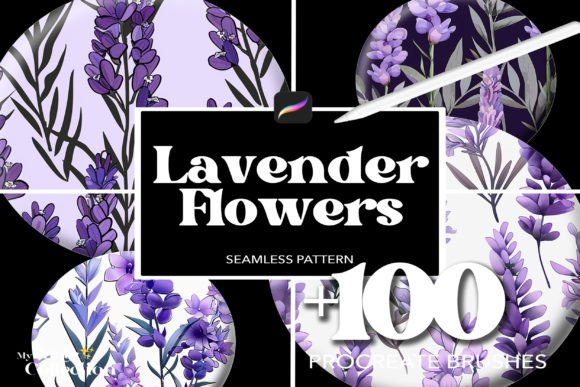
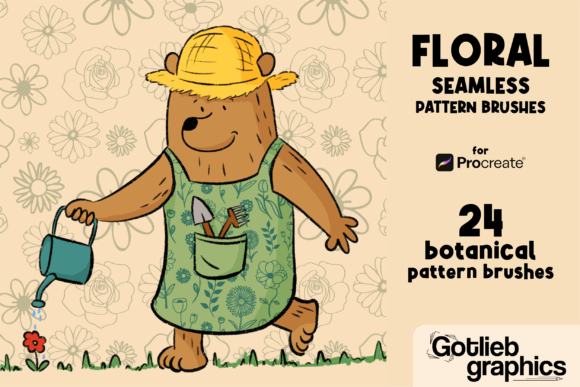
For digital artists and designers using the Procreate app on iPad, seamless pattern brushes are a powerful tool to elevate your creative work. The Flower Seamless Pattern Brushes for iPad offer a curated collection of 24 high-quality brushes that allow you to create beautiful, repeatable floral designs with ease. Whether you're designing stationery, apparel, digital illustrations, or social media graphics, these brushes streamline the process while maintaining a professional finish.
Why Seamless Pattern Brushes Matter
Seamless patterns are essential in design because they allow for continuous, repeatable visuals without visible edges or breaks. Traditionally, creating these patterns from scratch can be time-consuming and technically challenging. With the Flower Seamless Pattern Brushes for iPad, this process is simplified—each brush is pre-configured to maintain its seamless flow as you paint, giving you more time to focus on creativity rather than technical adjustments.
These brushes are especially valuable for artists who want to add intricate floral motifs without the hassle of manually aligning elements. Whether you're creating backgrounds, borders, or full illustrations, the seamless nature ensures your designs look polished and cohesive.
Creative Possibilities with Floral Pattern Brushes
The versatility of the Flower Seamless Pattern Brushes for iPad makes them suitable for a wide range of creative projects. Here are a few ideas to spark your imagination:
- Stationery Design: Create custom wedding invitations, greeting cards, and planners with elegant floral borders and backgrounds.
- Apparel and Fabric Design: Use the brushes to draft repeat patterns for clothing, scarves, or home décor items like pillow covers and curtains.
- Digital Illustration: Enhance botanical illustrations or character art with floral backgrounds that add depth and visual interest.
- Social Media Content: Design Instagram posts, Pinterest graphics, or TikTok thumbnails with eye-catching floral textures that stand out in feeds.
- Print-on-Demand Products: Build unique designs for mugs, phone cases, tote bags, and more by leveraging the repeatable nature of these patterns.
Who Can Benefit from These Brushes?
This brush set is ideal for a variety of users across different creative fields:
- Graphic Designers: Speed up pattern creation for client projects, especially those involving branding, packaging, or print materials.
- Illustrators: Add depth and texture to illustrations without needing to redraw complex elements.
- Content Creators: Use floral textures to enhance digital content for blogs, YouTube thumbnails, or digital planners.
- Entrepreneurs: Quickly design product mockups or branded assets for print-on-demand services or small business branding.
- Hobbyists: Explore digital art with a professional touch, even if you're just starting out in Procreate.
Whether you're a seasoned professional or a creative beginner, these brushes provide a flexible foundation that adapts to your unique style and project needs.
How to Use These Brushes Effectively
To get the most out of the Flower Seamless Pattern Brushes for iPad, consider the following tips:
- Experiment with Scale: Adjust the brush size to fit your canvas. Smaller scales work well for subtle textures, while larger ones make bold design statements.
- Layer for Depth: Combine multiple brushes to build layered patterns that add dimension and complexity to your work.
- Color Variations: Use Procreate’s color adjustment tools to recolor patterns and match your brand or project palette.
- Test in Context: Preview your patterns in the final format—whether that's a card layout, fabric swatch, or digital background—to ensure they work visually and functionally.
By understanding how each brush behaves and how they interact with other design elements, you can maintain a clean, consistent look across your projects.
Adapting for Different Audiences and Platforms
One of the strengths of the Flower Seamless Pattern Brushes for iPad is their adaptability. Here’s how different creators can tailor their use:
- For Educators: Create visually engaging worksheets or digital teaching materials with floral accents that feel inviting and professional.
- For Marketers: Design branded assets like banners, social media templates, or digital ads with cohesive, eye-catching patterns.
- For Bloggers: Enhance blog headers, infographics, or printable content with elegant, custom-designed backgrounds.
- For Freelancers: Offer clients a wider range of design options by integrating these brushes into your workflow for faster, more polished results.
Because these brushes are digital and fully editable, they can be adapted to suit different audiences, aesthetics, and formats without losing quality or flexibility.
Staying Organized and Consistent
When working with multiple pattern brushes, it’s important to keep your layers and color schemes organized. Here are a few best practices:
- Use Layer Groups: Keep pattern elements on separate layers so you can adjust them independently without disrupting your overall design.
- Stick to a Color Palette: Choose a limited color scheme to maintain visual harmony, especially when layering multiple patterns.
- Save Custom Swatches: Create and save custom color swatches in Procreate to ensure consistency across multiple projects.
- Label Your Layers: Especially useful when collaborating or revisiting a project later, clear layer names help you navigate your design efficiently.
These small habits can make a big difference in the clarity and professionalism of your final output.
Final Thoughts
The Flower Seamless Pattern Brushes for iPad are more than just a set of digital tools—they’re a gateway to more efficient, expressive, and visually rich design work. Whether you're creating for personal joy or professional output, these brushes help you bring floral elegance into your digital art with minimal effort and maximum impact. By understanding how to apply them creatively and strategically, you can elevate your work across a variety of platforms and purposes.