Procreate Calligraphic Brushes ii: A Precision Tool for Digital Lettering Workflows
In the realm of digital typography and hand-lettering, consistency is often the difference between a rough sketch and a professional deliverable. Procreate Calligraphic Brushes ii represents a specialized asset designed to bridge that gap. Unlike standard calligraphy brushes that rely on pressure sensitivity alone to create stroke variation, this brush set offers a rigid, geometric approach to ribbon-shaped letterforms. It is an essential resource for designers, illustrators, and entrepreneurs who require predictable outcomes when creating logos, headers, invitations, or editorial typography.
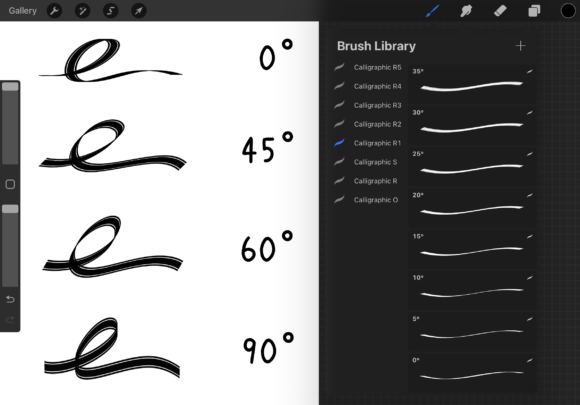
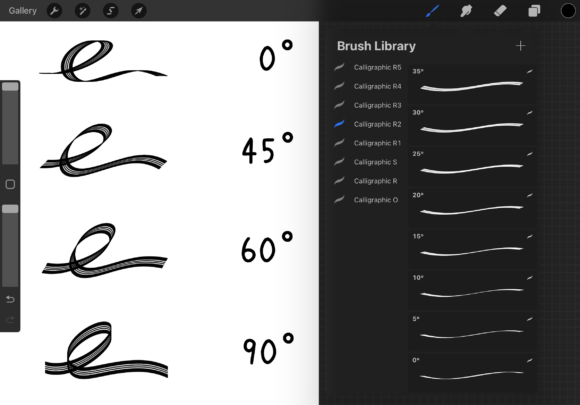
This toolset is not merely a collection of strokes; it is a system built for efficiency. By providing 37 distinct brushes ranging from 0° to 180° in multiples of 5°, it eliminates the guesswork involved in maintaining consistent angle across complex words or sentences. For professionals managing tight deadlines, the ability to switch angles instantly without recalibrating settings is a significant workflow advantage. Whether you are a freelancer delivering client assets or an educator teaching the fundamentals of blackletter and gothic styles, understanding how to integrate these tools into your process is crucial for maximizing their potential.
Understanding the Ribbon Shape Mechanism
The core functionality of Procreate Calligraphic Brushes ii lies in its ribbon shape construction. In traditional calligraphy, the nib angle dictates the thickness and flow of the ink. Digitally, this is often simulated by rotating a brush tip based on stylus movement. However, dynamic rotation can sometimes lead to jittery lines or inconsistent widths if the user's hand is unsteady.
This specific brush set solves that problem by locking the angle. Each of the 37 brushes is pre-configured to a specific degree. When you select the 45° brush, every stroke you make will maintain that exact 45° orientation relative to the canvas. This creates clean, uniform parallel lines that define the "ribbon" aesthetic. The result is a typeface that looks mechanically precise yet retains the organic feel of hand-drawn art. This level of control is particularly valuable when working on projects where brand consistency is paramount, such as designing a logo suite or creating a series of social media graphics.
Integration into Professional Workflows
To get the most out of Procreate Calligraphic Brushes ii, it must be viewed as part of a broader design pipeline rather than an isolated drawing tool. Its utility spans the entire lifecycle of a creative project, from initial concepting to final delivery.
Pre-Project Preparation and Planning
Before opening Procreate, effective use of this brush set requires a brief planning phase. Because the brushes are angle-specific, knowing your target style beforehand saves time. If you are aiming for a classic Roman capital look, you might plan to use the 30° to 45° range. For a more dramatic, steep slant often seen in modern script, the 60° to 90° range becomes relevant.
Organizing your workspace is also critical. Since the set includes 37 individual brushes, loading them all into a single layer group can clutter your interface. A best practice is to create a dedicated folder within your Procreate library named "Calligraphic Angles." Within this folder, you can sub-categorize by degree ranges (e.g., "Low Angles," "Mid Angles," "High Angles"). This organizational strategy ensures that when you are deep in the creative process, you can locate the necessary tool in seconds, maintaining your creative momentum.
Execution and Drafting
During the actual creation phase, the workflow shifts to rapid iteration. One of the primary advantages of this set is the ability to test different angles quickly without adjusting brush dynamics. You can draft a word at 45°, then immediately switch to the 50° brush to see how the slight change affects the overall rhythm of the text. This comparative testing is invaluable for refining typography.
For users collaborating with others, such as a designer handing off assets to a developer, the precision of these brushes ensures that the vectorized version of the artwork remains true to the original intent. The clean edges produced by the ribbon shape minimize the need for post-processing cleanup, streamlining the transition from raster sketch to vector file.
Post-Production and Quality Control
Once the lettering is complete, the focus turns to quality control. The uniformity provided by Procreate Calligraphic Brushes ii makes it easier to spot inconsistencies in spacing or weight. Because the stroke width is determined by the fixed angle and the speed of your hand, any deviations in line thickness are immediately visible as errors in execution rather than artifacts of the brush engine. This clarity allows for faster corrections and a higher quality final product.
Customization: Changing the Brush Shape
While the preset angles provide excellent structure, the versatility of Procreate Calligraphic Brushes ii is further enhanced by its editable nature. All brushes in this set were created using Procreate 5.3.6, ensuring compatibility with current versions while retaining the flexibility to be modified. The set includes one alternate brush and one bonus guide specifically designed to teach users how to alter the tip and opacity settings.
Changing the shape of the brush allows you to adapt the tool to different paper textures or stylistic needs. To modify the brush:
- Navigate to the Brush Library and long-press the desired calligraphic brush.
- Select "Duplicate" to create a copy, preserving the original for future use.
- Enter the Brush Studio by tapping the pencil icon next to the duplicate.
- Locate the "Shape" section. Here, you can adjust the size, roundness, and texture of the ribbon tip.
- For opacity adjustments, move to the "Stabilizer" or "Rendering" tabs depending on the desired effect. The bonus guide brush included in the set demonstrates specific settings for achieving softer edges or varying transparency.
This customization capability means the brush set is not static. As your style evolves or as client requirements change, you can tweak the ribbon width or the hardness of the edge to match new trends. This adaptability extends the lifespan of the asset, making it a sustainable investment for long-term creative work.
Compatibility and Technical Considerations
When integrating new assets into a professional toolkit, technical stability is non-negotiable. Procreate Calligraphic Brushes ii was developed with Procreate 5.3.6, a stable release that serves as a robust foundation for modern iPad workflows. Users should ensure their software is updated to at least this version to guarantee full functionality, including the specific rendering behaviors of the ribbon shapes.
Performance is another factor. Because these brushes utilize fixed angles rather than complex dynamic calculations, they are generally lightweight and perform smoothly even on older iPad models. This efficiency is beneficial for users who work on large canvases or manage multiple layers simultaneously. There is minimal lag, allowing for fluid, uninterrupted drawing sessions which is essential for maintaining the natural flow of handwriting.
Furthermore, the file format is standard for Procreate, meaning the brushes can be easily imported via AirDrop, email, or cloud storage. This portability supports remote work and collaboration. A team member in a different location can receive the brush set, install it, and immediately begin working with the same visual language as the rest of the team, ensuring brand consistency across distributed workflows.
Strategic Use Cases and Outcomes
The practical applications for Procreate Calligraphic Brushes ii extend beyond simple decoration. They serve strategic purposes in various business and creative contexts.
- Brand Identity Design: Consistent lettering angles are vital for logo design. Using these brushes helps establish a cohesive visual identity that communicates professionalism and attention to detail.
- Marketing Materials: From social media posts to printed brochures, high-quality typography captures attention. The clean lines of the ribbon brushes ensure legibility and aesthetic appeal across different mediums.
- Education and Training: Educators can use the 0° to 180° progression to teach students about the mechanics of letterforms. The step-by-step angular increments provide a clear visual aid for understanding how angle influences character shape.
- Publishing and Editorial: Magazine editors and book publishers often require custom headlines. These brushes offer a quick way to generate unique typographic elements that stand out from standard font libraries.
Ultimately, the value of Procreate Calligraphic Brushes ii lies in its ability to streamline the decision-making process. By removing the variable of angle inconsistency, it allows creators to focus on composition, spacing, and artistic expression. It transforms a potentially tedious technical challenge into a smooth, intuitive part of the creative routine. For anyone serious about digital lettering, mastering this toolset is a logical step toward elevating the quality and efficiency of their output.