Unlock Creativity with Procreate Oval Calligraphic Brushes: A Complete Guide
What Are Procreate Oval Calligraphic Brushes?
Procreate Oval Calligraphic Brushes are a specialized set of digital tools designed for artists, calligraphers, and designers who want to create elegant, flowing letterforms and strokes. These brushes mimic the behavior of traditional calligraphy tools but with the flexibility and precision of digital art. The unique feature of these brushes is their oval-shaped tip, which allows for a wide range of stroke widths and angles depending on how you tilt or rotate your stylus.
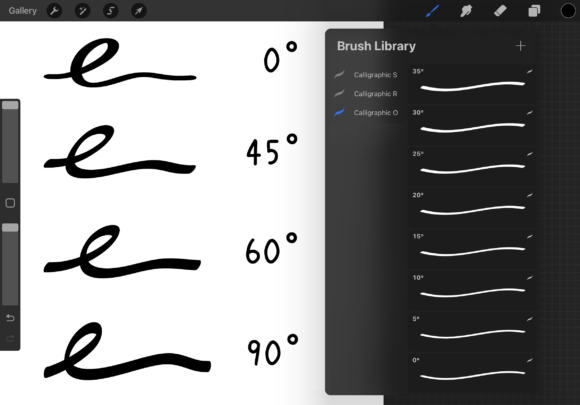
Each brush in this set is crafted using Procreate 5.3.6, ensuring compatibility and performance for users of this popular digital art app. The set includes 37 brushes that range from 0° to 180° in 5° increments, giving you precise control over the angle of your strokes. Additionally, you’ll receive 1 alternate brush and 1 bonus brush to help you understand how to customize and modify the brushes for your personal style.
Why Use Oval Calligraphic Brushes?
Oval calligraphic brushes are ideal for creating smooth, dynamic strokes that are essential for modern calligraphy, hand-lettering, and typography. Unlike round or flat brushes, oval-shaped brushes respond differently to pressure and angle, offering a more natural and expressive feel. This makes them especially useful for:
- Creating elegant script lettering
- Designing logos and brand typography
- Producing artistic illustrations with calligraphic flair
- Enhancing digital journaling and bullet journaling
Whether you're a beginner exploring the world of digital calligraphy or a seasoned artist looking to refine your workflow, these brushes can significantly enhance your creative output.
How Do Oval Calligraphic Brushes Work in Procreate?
In Procreate, brushes are highly customizable, and the oval calligraphic brushes take full advantage of this flexibility. Each brush in the set is pre-configured with a specific oval angle, allowing you to instantly switch between different stroke styles without manual adjustments.
Here’s how they work:
- Angle Sensitivity: The oval shape reacts to the tilt of your stylus, producing thin and thick strokes based on your hand movement.
- Pressure Control: You can adjust how much pressure affects the stroke width, opacity, and flow.
- Customization: With the bonus brush included, you can learn how to tweak settings like grain, opacity, and smoothing to suit your personal style.
Because these brushes are built with Procreate’s advanced brush engine, they offer a realistic and responsive experience that closely mimics traditional ink and nib tools.
How to Change the Shape of a Calligraphic Brush in Procreate
One of the most powerful features of Procreate is the ability to customize brushes to fit your needs. If you want to modify the oval shape or create your own angle variations, follow these steps:
- Open the Brush Library: Tap the brush icon in the top-right corner of your canvas.
- Select the Brush: Choose the oval brush you'd like to edit.
- Edit the Brush Settings: Tap the wrench icon next to the brush name to enter the brush studio.
- Adjust the Shape: Under the “Grain” or “Shape” tab, you can change the aspect ratio of the brush tip to make it more or less oval.
- Modify Angle and Tracking: In the “Stroke” tab, you can adjust how the brush responds to tilt and pressure.
- Save Your Custom Brush: Once you’re satisfied, tap “Duplicate” and give your new brush a name.
The included bonus brush serves as a guide to help you understand these settings and encourages experimentation. Whether you're adjusting the oval shape for a specific project or creating a completely new brush from scratch, the process is intuitive and rewarding.
Who Can Benefit from Using These Brushes?
These brushes are designed for a wide audience, including:
- Calligraphers: Digital calligraphers can replicate traditional pen techniques with greater flexibility.
- Lettering Artists: Those who specialize in hand-lettering can achieve consistent and dynamic strokes effortlessly.
- Graphic Designers: Designers can integrate custom calligraphic elements into logos, posters, and branding materials.
- Hobbyists: Anyone interested in creative writing, journaling, or digital art can enjoy the expressive potential of these brushes.
Whether you're creating content for social media, designing a wedding invitation, or simply practicing your lettering skills, these brushes offer a professional-level toolset that’s accessible to everyone.
Practical Applications in Modern Creativity
In today’s digital world, creativity is more accessible than ever. Tools like Procreate and its brush ecosystem empower artists to create stunning work from anywhere. The oval calligraphic brushes are especially relevant in several modern contexts:
- Remote Work: Freelancers and remote designers can use these brushes to add unique, hand-crafted elements to client projects.
- Educational Use: Art and design students can learn digital calligraphy techniques without the need for physical tools.
- Entrepreneurship: Small business owners can design their own branding materials, from social media graphics to packaging labels.
- Personal Expression: Journalers and hobbyists can enhance their digital notebooks with beautiful, handwritten text and illustrations.
These brushes not only improve the quality of your work but also streamline your creative process, allowing you to focus more on your art and less on technical adjustments.
Common Misconceptions About Calligraphic Brushes
Some users may believe that calligraphic brushes are only for experts or that they require a steep learning curve. However, the reality is quite different:
- Misconception: You need to know traditional calligraphy to use these brushes effectively.
Reality: While knowledge helps, Procreate’s intuitive interface and pre-configured brushes make it easy for anyone to start creating beautiful lettering right away. - Misconception: Digital brushes can’t replicate the feel of real ink and paper.
Reality: With advanced brush settings and pressure-sensitive styluses, digital calligraphy can closely mimic traditional tools. - Misconception: Customizing brushes is too complicated.
Reality: The bonus brush included in this set provides a simple, guided way to learn brush customization.
By dispelling these myths, we can encourage more people to explore the world of digital calligraphy and unlock their creative potential.
Conclusion: Elevate Your Digital Art with Oval Calligraphic Brushes
The Procreate Oval Calligraphic Brushset is more than just a collection of tools — it's a gateway to expressive, professional-quality digital calligraphy. With 37 pre-configured brushes and customization options, this set empowers artists of all levels to create stunning lettering, typography, and illustrations. Whether you're a professional designer or a hobbyist exploring your creativity, these brushes offer the flexibility, realism, and ease of use that modern digital artists demand.
By understanding how to use and modify these brushes, you open up a world of creative possibilities. So why not download the brushset today and start experimenting with your own unique style? Your next masterpiece is just a stroke away.