Explosion Photoshop Brushes: A Practical Evaluation
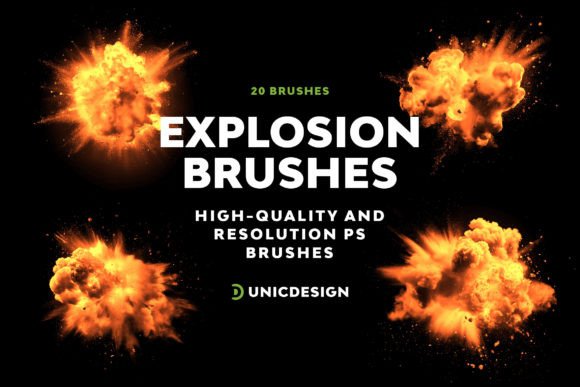
For digital artists, concept designers, and illustrators working within the realm of action-oriented imagery, the ability to render dynamic effects efficiently is often a critical workflow component. One specific tool designed to address this need is the Explosion Photoshop Brushes collection. This set provides 20 distinct brush presets aimed at generating detailed explosion effects without requiring the artist to paint every particle from scratch. Understanding the capabilities, limitations, and appropriate use cases for these brushes is essential for determining whether they align with your specific project requirements.
Understanding the Toolset
The Explosion Photoshop Brushes package consists of 20 unique versions of explosion shapes. These are not simple static images but rather brush definitions that allow for variation in size, opacity, and flow when applied in Adobe Photoshop. The core technical specification of this collection is its resolution; the brushes boast a pixel density reaching approximately 2000 px. This high-resolution feature ensures that the edges of the explosions remain crisp even when scaled up for large-format prints or high-definition displays.
Compatibility is another foundational aspect of this tool. The brushes are engineered to function seamlessly across a wide range of software iterations, specifically from Photoshop CS6 through to CC 2022 and beyond. This broad compatibility window means that users on older hardware running legacy software can utilize the same assets as those on the latest creative cloud updates. Additionally, the package includes a Readme file intended to guide installation and usage, alongside access to 24/7 support from UnicDesign for troubleshooting.
Why Artists Consider Explosion Brushes
The primary motivation for seeking out specialized brush sets like Explosion Photoshop Brushes is efficiency. Creating a realistic explosion manually involves layering multiple elements: fire, smoke, debris, shockwaves, and lighting effects. Each of these components requires careful attention to texture, color blending, and motion blur. For projects with tight deadlines, such as comic book illustration, storyboard creation, or game asset prototyping, painting these effects from zero can be prohibitively time-consuming.
Furthermore, consistency is a significant factor. When an artist needs to place multiple explosions within a single scene—such as a battlefield or a sci-fi cityscape—using a standardized brush ensures that the visual language remains uniform. The 20 distinct versions included in this set offer enough variety to prevent repetition while maintaining a cohesive style. This balance allows creators to populate a scene quickly without sacrificing the illusion of complexity.
Benefits and Workflow Integration
The most immediate benefit of using this collection is the reduction in manual labor. By leveraging pre-defined shapes, artists can focus their energy on composition, lighting, and narrative rather than the tedious process of rendering individual sparks and smoke plumes. The high pixel density (approx. 2000 px) supports non-destructive workflows. Because the brushes are high-resolution, artists can apply them at full scale and then reduce their size without losing clarity, offering flexibility during the editing phase.
Usability is also a strong point. The inclusion of a Readme file simplifies the import process, ensuring that even users less familiar with custom brush installation can get started quickly. The promise of 24/7 support adds a layer of security for professional users who cannot afford downtime due to technical glitches. If a brush fails to load or behaves unexpectedly, the availability of direct contact channels via the provided links in the documentation helps resolve issues rapidly.
Tradeoffs and Limitations
While efficient, relying on preset brushes does come with tradeoffs. The primary limitation is the potential for a "stock" look. Because the underlying shape is generated from a fixed source file, overuse of the same brush can make a scene feel repetitive or artificial, regardless of how many variations are available. To mitigate this, artists must actively manipulate the brush settings, adjusting scatter, size jitter, and color dynamics to break up the uniformity.
Another consideration is the level of control. While these brushes provide a solid foundation, they may lack the granular detail required for hyper-realistic photobashing where every particle of debris needs to interact physically with the environment. In such scenarios, a brush might serve as a base layer, but it will likely require significant post-processing, masking, and overlaying with hand-painted details to achieve a truly bespoke result. Users expecting a "one-click" solution for photorealism may find the results require more refinement than anticipated.
Ideal Use Cases
The Explosion Photoshop Brushes are a strong fit for several specific scenarios:
- Concept Art and Storyboarding: In these phases, speed and communication of ideas are paramount. Detailed explosions help convey action and impact without needing final polish.
- Comic Book and Graphic Novel Illustration: Stylized explosions are common here, and the variety in the 20-brush set allows for dynamic panel layouts.
- Game Asset Prototyping: Developers often need quick placeholders for special effects (VFX) to test gameplay mechanics before investing in complex 3D particle systems.
- Background Design: For environments where explosions are secondary elements in the distance, these brushes provide sufficient detail without consuming excessive render time.
When to Consider Alternatives
There are situations where alternative methods may yield better results. If a project demands photorealism indistinguishable from live-action footage, procedural generation tools or dedicated VFX software (like After Effects or Houdini) combined with 3D compositing might be superior. These tools simulate physics, lighting, and fluid dynamics in ways that static 2D brushes cannot.
Additionally, if an artist is developing a highly stylized, unique aesthetic that deviates significantly from standard explosion tropes, starting from scratch or creating custom brushes may be necessary. Presets are inherently based on existing data; if the desired look does not exist in the dataset, the brush becomes a constraint rather than an aid. In these cases, the time saved by using the brush might be lost trying to modify it to fit a niche requirement.
Decision-Making Insights
Before integrating Explosion Photoshop Brushes into your workflow, evaluate your project's end goal. Ask yourself if the priority is speed and volume of output or absolute, frame-accurate realism. If you are producing content where the explosion is a supporting element to the story or character, this tool offers a high return on investment regarding time management.
Consider your proficiency with Photoshop's brush engine. The value of these 20 brushes is maximized when the user understands how to tweak spacing, texture, and transfer settings. Without this knowledge, the brushes may appear flat or repetitive. However, for those willing to experiment with the settings, the high resolution and variety provide a robust toolkit.
Finally, assess the long-term utility. Since the brushes are compatible with versions from CS6 to CC 2022+, they represent a future-proof asset for most standard workflows. The presence of customer support further reduces the risk of adoption. Ultimately, these brushes serve best as a powerful accelerator for artists who understand that the tool provides a foundation, not a finished product. By combining these presets with artistic judgment and additional detailing, creators can achieve stunning impact while maintaining a sustainable pace of work.