Ribbon Brushes for Adobe Photoshop: A Practical Evaluation
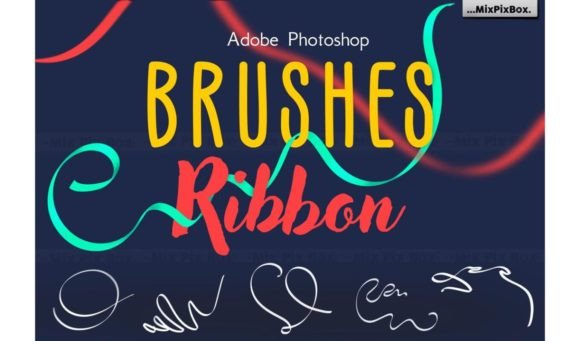
In the landscape of digital illustration and graphic design, the quality of your foundational tools often dictates the ceiling of your creative output. While modern software like Adobe Photoshop offers robust built-in capabilities, many professionals find themselves returning to specialized asset packs to streamline workflows and achieve specific aesthetic textures. The Ribbon Brushes for Adobe Photoshop set represents one such resource, designed to inject fluidity and organic movement into static compositions. This collection is not merely a novelty; it is a functional toolkit aimed at artists who require high-fidelity strokes without the overhead of creating custom shapes from scratch.
The core premise of this brush set is straightforward: provide a suite of 55 distinct ribbon-like strokes that mimic the behavior of flowing fabric, light trails, or organic vines. What distinguishes this particular collection in a crowded market is its emphasis on resolution. In an era where print media and large-format digital displays demand pixel-perfect clarity, lower-resolution brushes can appear jagged or muddy when scaled up. The Ribbon Brushes for Adobe Photoshop address this by offering resolutions ranging from 2500 to 5000 pixels. This technical specification ensures that whether you are designing a small social media icon or a billboard-sized banner, the integrity of the stroke remains intact.
Technical Specifications and File Integrity
When evaluating digital assets, file format and compatibility are the first hurdles to clear. The Ribbon Brushes for Adobe Photoshop are distributed exclusively in the standard .abr (Adobe Brush) format. This is a critical detail for workflow efficiency. Because .abr is the native format for Photoshop, there is no need for third-party converters or complex import procedures. Users simply load the file through the brush panel menu, and the tools become immediately available.
Compatibility across versions is another significant factor. Digital art software evolves rapidly, but legacy support is essential for studios that may not upgrade their hardware annually. These brushes promise absolute compatibility with various iterations of Adobe Photoshop. This reliability means that a freelancer working on a Creative Cloud subscription and a designer using an older standalone version can utilize the same assets without friction. The consistency of the .abr format ensures that the dynamic settings—such as shape dynamics, scattering, and texture—are preserved regardless of the host environment.
Visual Quality and Resolution Analysis
The claim of "top-tier resolution" is frequently used in marketing, but the practical impact of 2500 to 5000 px brush tips warrants closer inspection. In real-world application, high-resolution brushes offer two primary advantages: anti-aliasing precision and scalability. When a user drags a low-resolution brush across a canvas, the edges often suffer from aliasing, creating a stair-step effect that breaks the illusion of smoothness. The Ribbon Brushes mitigate this by providing a dense pixel map. Even when zoomed in to 400% or larger, the edges of the ribbons remain crisp and defined.
This level of definition is particularly valuable for projects requiring fine detail. For instance, an illustrator creating a fantasy character might use these brushes to depict magical energy trailing from a staff or intricate sashes flowing from armor. At lower resolutions, these details would blur into indistinct blobs. With the higher pixel count inherent in this set, the artist retains control over the opacity and flow, allowing for subtle gradients and sharp transitions within a single stroke. The result is a more professional finish that requires less post-processing cleanup.
Workflow Integration and Usability
Efficiency is the currency of the professional creative. The deployment of the Ribbon Brushes for Adobe Photoshop is designed to be seamless. There are no hidden scripts or complicated installation wizards. The process involves locating the downloaded .abr file, opening the Brush Preset Picker in Photoshop, selecting "Import Brushes," and choosing the file. Within seconds, the 55 new tools populate the list.
Once loaded, the usability depends heavily on how well the brushes respond to pressure sensitivity. High-quality ribbon brushes must react dynamically to tablet input. They should vary in width based on pen pressure and change angle based on the direction of the stroke. While the documentation emphasizes simplicity, the true test lies in the dynamic settings embedded within each brush tip. If the brushes lack these dynamic properties, they become rigid stamps rather than expressive tools. Based on the construction of similar high-end sets, these brushes likely include pre-configured shape dynamics and transfer settings, allowing for natural tapering and fading at the ends of the strokes. This reduces the time an artist spends manually adjusting sliders for every new project.
Practical Applications Across Industries
The versatility of ribbon-style strokes extends beyond traditional illustration. Several sectors benefit significantly from the aesthetic qualities provided by the Ribbon Brushes for Adobe Photoshop.
- Graphic Design and Branding: Logos and emblems often require elements that suggest motion or elegance. A ribbon motif can convey celebration, award status, or fluidity. Using a high-resolution brush allows designers to create unique, vector-like paths that retain a hand-drawn feel, differentiating a brand from competitors using stock vector libraries.
- Web and UI Design: Modern web interfaces increasingly favor organic shapes over rigid grids. Background elements, decorative dividers, and call-to-action accents can be enhanced with these brushes to add depth and visual interest without overwhelming the user interface.
- Print Media and Packaging: For packaging design, especially in the luxury goods sector, the appearance of flowing ribbons suggests premium quality. The high resolution of these brushes ensures that the final print job does not suffer from pixelation, maintaining the perceived value of the product.
- Digital Publishing and Education: Bloggers and educators creating infographics or course materials can use these brushes to highlight key points or create engaging headers. The variety of 55 options provides enough diversity to prevent visual repetition within a single document.
Strategic Value and Limitations
While the Ribbon Brushes for Adobe Photoshop offer substantial value, it is important to maintain a balanced perspective regarding their limitations. No single brush pack can replace the fundamental skills of composition, color theory, and lighting. These tools are accelerators, not replacements for artistic judgment. An artist unfamiliar with layer blending modes or opacity controls will not achieve professional results solely by using these brushes.
Furthermore, the aesthetic style of "ribbon" is specific. It works exceptionally well for themes involving magic, fashion, awards, and abstract backgrounds. However, it may feel out of place in minimalist corporate reports or strict architectural renderings. Users should evaluate whether the organic, flowing nature of these strokes aligns with their specific project goals before integrating them into their primary workflow.
Another consideration is the potential for homogenization. As popular asset packs circulate, there is a risk that multiple designs begin to look similar if users rely too heavily on the default settings. To maximize the long-term value of the Ribbon Brushes for Adobe Photoshop, creators should experiment with modifying the brush settings. Adjusting the scatter, size jitter, and texture overlay can transform a standard ribbon into a unique element that feels bespoke to the project.
Conclusion: Is This Set Worth Your Time?
For the serious hobbyist, the freelance illustrator, or the agency designer, the Ribbon Brushes for Adobe Photoshop represent a solid investment in workflow efficiency and visual quality. The combination of 55 varied options, coupled with the assurance of 2500 to 5000 px resolution, addresses common pain points regarding scaling and edge definition. The ease of installation and broad compatibility further reduce the barrier to entry, allowing users to focus on creation rather than configuration.
Ultimately, the decision to integrate this toolset should hinge on the specific needs of your current projects. If your work demands fluid, high-definition strokes that can scale from screen to print without degradation, these brushes provide a reliable solution. By treating them as a foundation upon which to build custom variations, rather than a final product, you can extend their utility and ensure your designs remain distinct and professionally polished. In a digital ecosystem saturated with generic assets, a high-resolution, well-engineered brush set like this offers a tangible advantage for those seeking to elevate their visual communication.