Flaming Photoshop Brushes for Dynamic Designs
Fire has always been a powerful visual element in design, capable of conveying energy, danger, passion, or transformation. However, creating realistic fire effects from scratch in Adobe Photoshop can be time-consuming and technically demanding. This is where specialized tools like Flaming Photoshop Brushes become indispensable assets for digital artists. By offering a pre-packaged set of high-resolution textures, these brushes allow you to inject dynamic, handcrafted fire elements into your work with a single click, bridging the gap between concept and execution.
The core value of this specific kit lies in its resolution and versatility. With each brush meticulously designed at over 2000 pixels, the resulting fire effects maintain crisp edges and natural gradients even when scaled up for large-format prints or high-definition web banners. Unlike low-quality stock brushes that often appear pixelated or repetitive, these tools provide the texture and depth necessary for professional-grade imagery. Whether you are a seasoned graphic designer or a creative novice, the intuitive nature of these brushes ensures they integrate seamlessly into your existing workflow without requiring complex masking or layering techniques.
Understanding the Technical Foundation
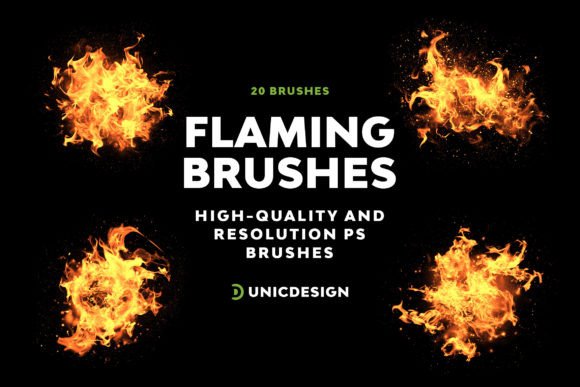
Before diving into creative applications, it is essential to understand what makes these Flaming Photoshop Brushes distinct from standard toolsets. The primary differentiator is the balance between realism and artistic control. Many free brush sets available online lack the structural integrity to look convincing under scrutiny. In contrast, this collection features 20 distinct versions of flaming brushes, each capturing a different stage of combustion, from the initial flicker to the roaring inferno.
Compatibility is another critical factor for any digital asset. The modern design landscape relies on software updates, which can sometimes break older plugins or brush files. This kit has been rigorously tested to ensure smooth operation across a wide spectrum of Adobe Photoshop versions. It supports legacy systems like CS6 as well as the latest iterations, including CC 2015.5, CC 2017, through to CC 2022. This broad compatibility means that whether you are working on an older workstation or the newest creative cloud setup, the performance remains consistent. There is no need to worry about version conflicts interrupting your creative flow.
Furthermore, the package includes a detailed Readme file. While experienced users might install brushes immediately, this documentation serves as a vital guide for troubleshooting and optimization. It explains how to load the .abr files correctly, adjust opacity settings for subtle glows, and blend modes for maximum impact. For those encountering technical glitches, the support team stands ready with round-the-clock assistance, ensuring that technical hurdles never stall your project.
Creative Applications Across Industries
The utility of Flaming Photoshop Brushes extends far beyond simple special effects. These tools can be adapted to serve diverse industries and communication goals. Here is how different professionals can leverage this set:
- Marketing and Advertising: Brands often use fire imagery to symbolize urgency, excitement, or "hot" deals. Marketers can use these brushes to create dynamic backgrounds for promotional posters, social media ads, or email headers. A burst of flame behind a product image can draw the eye immediately, increasing engagement rates.
- Gaming and UI Design: Game developers and interface designers frequently need elemental effects for character abilities, skill icons, or environmental hazards. These brushes provide a quick way to prototype fire spells, burning traps, or lava flows without needing 3D rendering software.
- Motion Graphics and Video: While primarily for static images, these brushes can be imported into After Effects or used as frame-by-frame assets in video editing. They add a layer of organic movement that is difficult to achieve with vector shapes alone.
- Digital Illustration and Concept Art: Artists working on fantasy or sci-fi themes can use the brushes to add atmospheric lighting. Instead of painting every spark manually, the brushes handle the chaotic geometry of the flames, allowing the artist to focus on composition and color grading.
Practical Techniques for Realistic Results
While the brushes are designed to be user-friendly, achieving a truly convincing result requires understanding how light and shadow interact with fire. Simply stamping a brush onto a black background rarely yields a professional outcome. To get the most out of the UnicDesign Flaming Brush Set, consider these practical approaches:
Layer Blending Modes
The secret to integrating fire into a scene lies in the blending mode. Most fire brushes are designed to work best with the "Screen," "Linear Dodge (Add)," or "Color Dodge" modes. These modes ignore the black areas of the brush stroke, allowing only the bright colors of the flame to show through while preserving the underlying details of your image. Experimenting with opacity is also crucial; lowering the opacity of the top layers can create a smoky, fading effect that mimics real-world physics.
Color Variation
Real fire is not just orange and yellow. It contains deep reds, cool blues at the base, and white-hot centers. Use the Hue/Saturation adjustment layers clipped to your brush strokes to shift the temperature. A blue-tinted flame suggests extreme heat or magical properties, while a deep crimson implies embers cooling down. This variation prevents the "stamped" look and adds narrative depth to your design.
Dynamic Motion Blur
Fire moves rapidly. To enhance the sense of motion, apply a slight directional blur to your brush strokes. This simulates the speed of the flames rising and swirling. Combining multiple brush sizes and angles creates a more chaotic, organic appearance that feels less rigid than a single, perfect shape.
Adapting to Different Audiences and Formats
One of the strengths of this 20-brush collection is its adaptability. The same asset can be repurposed for different audiences by adjusting the intensity and context. For a corporate presentation, a subtle, stylized flame might represent innovation or growth without being distracting. In this case, using a lower opacity and a softer edge creates a sophisticated backdrop.
Conversely, for a youth-oriented music festival poster, the goal is high energy and impact. Here, you would utilize the full resolution and saturation of the brushes, perhaps combining several types to create a massive explosion of color. The ability to scale these brushes without losing quality ensures they look equally impressive on a small mobile screen or a massive billboard.
Freelancers and small business owners will find this efficiency particularly valuable. Time is money, and spending hours painting individual sparks is often not feasible for tight deadlines. Having a reliable library of Flaming Photoshop Brushes allows you to deliver high-quality visuals quickly, giving you more time to focus on strategy and client communication.
Maintaining Consistency and Originality
When using pre-made assets, there is a risk of your work looking generic. To avoid this, treat the brushes as raw materials rather than final products. Always customize them to fit the specific lighting conditions of your scene. If your main subject is lit from the left, ensure your fire shadows and highlights align accordingly.
Organization is also key to maintaining a clean workspace. Since the kit includes 20 distinct versions, grouping them logically within your Photoshop presets panel can save significant time during production. Labeling them by intensity or color temperature helps you locate the right effect instantly. Additionally, keeping the Readme file accessible ensures you can quickly reference usage tips if you encounter unexpected results.
Ultimately, the goal of using tools like the UnicDesign Flaming Brush Set is to expand your creative capabilities, not limit them. By mastering these resources, you gain the freedom to explore bold ideas and execute them with precision. Whether you are illuminating a dark composition or adding a touch of warmth to a cold design, these brushes provide the spark needed to bring your vision to life. Light up your creative journey today and discover the endless potential hidden within these dynamic tools.