Evaluating Meteor Photoshop Brushes for Celestial Design
In the realm of digital art and graphic design, the ability to render realistic natural phenomena is often a defining factor in the quality of a final composition. Among the various tools available for creating atmospheric effects, Meteor Photoshop Brushes have emerged as a specialized asset for artists seeking to depict celestial events. These brushes are designed to replicate the streaks, glows, and particle dispersion associated with meteors entering an atmosphere. For designers working on space-themed projects, fantasy landscapes, or dramatic night scenes, understanding the capabilities and limitations of such a toolset is essential before integrating it into a workflow.
Understanding the Toolset
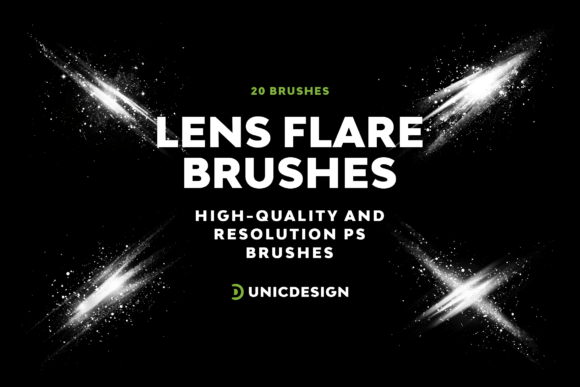
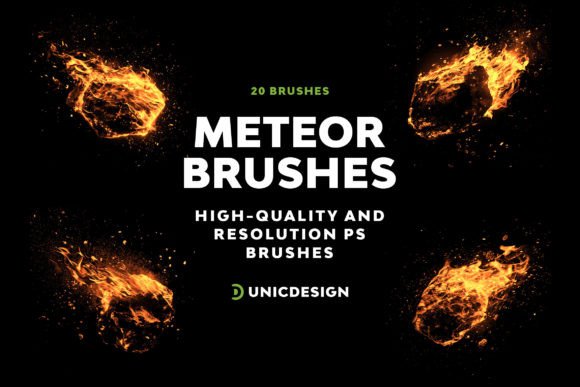
Meteor Photoshop Brushes refer to a collection of custom brush presets compatible with Adobe Photoshop. Unlike standard round or square brushes used for basic painting, these assets utilize complex shape dynamics, scattering, and texture settings to mimic the physics of falling stars. A typical high-quality set, such as the one containing 20 distinct variations, offers a range of sizes and intensities. The resolution of these brushes is a critical technical specification; sets that reach up to 2000 pixels ensure that the details remain crisp even when scaled significantly within a large canvas. This high resolution prevents pixelation, which is a common issue when using lower-quality assets on modern, high-definition displays.
The versatility of these brushes lies in their pre-configured settings. Rather than manually adjusting flow, opacity, and scatter for every stroke, the user can select a specific meteor type from the palette and apply it immediately. This streamlines the process of adding multiple light trails across a skybox, allowing for rapid iteration and experimentation with different compositions.
Reasons for Interest and Application
Designers typically seek out Meteor Photoshop Brushes when they encounter the need for speed and consistency in rendering complex lighting effects. Creating a realistic meteor trail from scratch requires layering multiple shapes, applying Gaussian blurs, and adjusting blend modes like "Screen" or "Linear Dodge." While this manual approach offers total control, it is time-consuming. Using a dedicated brush set allows an artist to achieve a similar visual result in a fraction of the time.
These tools are particularly relevant for several specific use cases:
- Concept Art and Storyboarding: Artists needing to quickly visualize a scene involving a meteor shower or a crash landing can use these brushes to establish mood and lighting without getting bogged down in technical details.
- Digital Photography Enhancement: Photographers capturing long-exposure night skies may wish to add additional meteors to a composition to enhance the narrative impact of the image.
- Fantasy and Sci-Fi Illustration: In genres where celestial bodies play a central role, having a library of varied meteor shapes helps maintain visual interest and avoids repetition.
Benefits and Technical Considerations
The primary benefit of utilizing a comprehensive pack of Meteor Photoshop Brushes is efficiency. With 20 different versions included in a single file, users have immediate access to a variety of styles, from faint, distant streaks to bright, fiery bolides. This variety ensures that a scene does not look monotonous. Furthermore, compatibility is a significant factor. Modern brush sets are generally engineered to work across a wide range of software versions, specifically from Photoshop CS6 through to the latest CC 2022 updates. This backward and forward compatibility ensures that the investment remains useful regardless of the specific version of the software the user currently employs.
However, there are tradeoffs to consider. Relying heavily on preset brushes can sometimes lead to a "stock" look if the artist does not customize the application. Every stroke generated by a brush has inherent characteristics that may become recognizable upon close inspection. To mitigate this, experienced designers often modify the brush settings after loading them—adjusting the size jitter, angle, or color dynamics—to better fit the specific perspective and lighting conditions of their artwork.
Another consideration is the learning curve associated with installation. While most users are familiar with loading .abr files, some may require guidance. Reputable packs include a Readme file detailing the installation steps. If issues arise, the availability of customer support can be a deciding factor for many buyers. Knowing that assistance is available ensures that technical hurdles do not delay the creative process.
Situations Where Alternatives May Be Preferable
While Meteor Photoshop Brushes are powerful, they are not the only solution for every scenario. There are situations where alternative methods might yield superior results:
- Photorealistic Compositing: If the project demands photorealism indistinguishable from actual photography, using real footage or photographs of meteors might be preferable. Brush strokes, no matter how well-crafted, can sometimes retain a painterly quality that clashes with hyper-realistic environments.
- Animation Projects: For motion graphics or video production, static Photoshop brushes are insufficient. Artists would need to look toward After Effects plugins or particle systems that can animate the movement, fade, and glow of meteors over time.
- Unique Physics Requirements: If a design requires a meteor with specific, non-standard physics (e.g., breaking apart in a unique pattern or interacting with a fictional atmosphere), a generic brush set may lack the necessary flexibility. In such cases, creating a custom brush or using procedural generation tools within Photoshop might offer more control.
Decision-Making Insights
When evaluating whether to acquire a set of Meteor Photoshop Brushes, potential users should assess their current workflow and project requirements. Ask yourself: Does my current method of creating light trails consume too much time? Do I need a variety of shapes to avoid visual repetition? If the answer is yes, then a brush pack is likely a strong fit. It serves as a force multiplier, allowing you to focus on composition and color rather than the mechanics of drawing individual particles.
Furthermore, consider the longevity of the tool. Since these brushes are compatible with versions ranging from CS6 to CC 2022, they represent a stable asset that will likely function correctly for years. The inclusion of documentation and support adds a layer of reliability, reducing the risk of frustration during the setup phase.
Ultimately, the decision rests on balancing convenience with creative control. For most designers looking to add celestial elements efficiently, Meteor Photoshop Brushes provide a practical solution. They bridge the gap between manual labor and automated generation, offering a middle ground that enhances productivity while maintaining the artistic integrity of the final piece. By understanding both the strengths and the limitations of these tools, artists can make informed choices that align with their specific design goals.