Glass Photoshop Brushes: Elevating Digital Realism
In the realm of digital design, the ability to simulate real-world materials is often the dividing line between a good image and a great one. Among these materials, glass stands out for its complexity. It reflects light, refracts objects behind it, and interacts with shadows in ways that can be incredibly difficult to render from scratch. This is where Glass Photoshop Brushes become an indispensable tool for artists, designers, and photographers looking to add depth and realism without spending hours on manual painting or complex masking.
The Art of Simulating Transparency
Creating realistic glass effects manually requires a deep understanding of light physics, layer blending modes, and intricate brush work. Designers must carefully paint highlights, adjust opacity gradients, and distort background elements to mimic refraction. While this process offers total control, it is time-consuming and demands a high level of technical proficiency. Glass Photoshop Brushes streamline this workflow by encapsulating these complex textures into single-click applications.
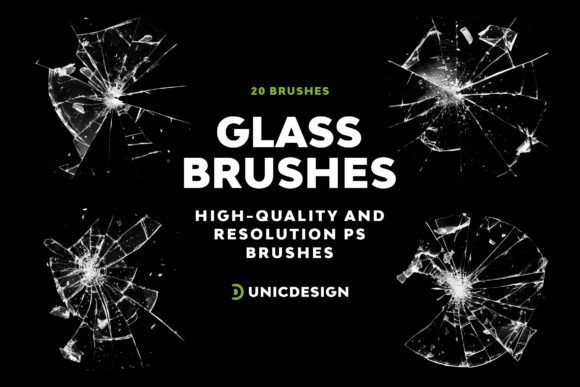
These brushes are not merely static images; they are dynamic tools designed to interact with your artwork. When you introduce our collection of 20 unique glass brushes into your toolkit, you are gaining access to meticulously crafted assets that breathe life into digital creations. Each brush is engineered to handle the nuances of transparency, edge definition, and light reflection, allowing users to achieve superior quality effects with remarkable speed.
High Resolution and Detail
One of the most critical factors in digital asset quality is resolution. Low-resolution brushes often result in jagged edges or pixelation when scaled up, ruining the illusion of reality. The glass brushes in this pack address this concern directly by sporting a high resolution of approximately 2000 px. This ensures that whether you are designing a small social media graphic or a massive billboard advertisement, the texture remains crisp and detailed. The rendering capabilities allow for impressive glass textures on every use, maintaining clarity even under close inspection.
Designed for Simplicity and Efficiency
Simplicity is at the heart of this product, offering a user-friendly experience that doesn't compromise on results. In the fast-paced world of creative production, efficiency is paramount. These tools are designed to integrate seamlessly into existing workflows. Instead of navigating through dozens of settings to create a pane of window glass or a shard of broken mirror, a designer can simply select the appropriate brush and apply it to a new layer.
This approach democratizes high-end design techniques. It allows professionals to focus on composition and color theory rather than getting bogged down in the minutiae of texture generation. Furthermore, the graphic pack includes 20 distinctive versions of glass brushes, further broadening your design possibilities. From frosted glass to clear panes, and from shattered fragments to elegant curved surfaces, the variety ensures that there is a specific texture for almost any visual requirement.
Compatibility Across Creative Environments
A significant barrier to adopting new digital assets is often software compatibility. Creators frequently worry about whether a new plugin or brush set will function correctly with their specific version of Adobe Photoshop. The versatility of these brushes is evident in their cross-compatibility. They blend seamlessly while meeting the demands of various Photoshop versions, including CS6, CC, CC 2015.5, CC 2017, CC 2018, CC 2019, CC 2020, CC 2021, and extending to CC 2022.
This wide range of support means that teams working across different legacy and modern systems can utilize the same assets without friction. Whether you are a freelancer using an older machine running CS6 or a studio utilizing the latest CC 2022 features, these Glass Photoshop Brushes are ready to perform. This consistency is vital for collaborative projects where file integrity and visual fidelity must remain constant across different workstations.
Real-World Applications and Scenarios
Understanding where and how to use these tools is just as important as knowing what they are. Here are several practical scenarios where these brushes excel:
- Architectural Visualization: Adding realistic windows to building renders instantly enhances the sense of scale and materiality. A simple stroke can turn a flat wall into a sunlit office space.
- Product Photography Enhancement: Photographers often need to retouch reflections on bottles, jars, or perfume containers. These brushes provide quick, realistic highlights and refractions that are difficult to capture perfectly in-camera.
- Digital Illustration: Artists creating fantasy or sci-fi scenes can use shattered glass effects to depict explosions or magical barriers, adding dynamic energy to their compositions.
- UI/UX Design: Modern interface design often incorporates "glassmorphism," a style featuring translucent, blurred backgrounds. These brushes can serve as excellent starting points for creating those subtle, frosted effects.
Support and Guidance for Every User
Even the most intuitive tools can present a learning curve for new users. Recognizing this, the package comes with a comprehensive Readme file providing in-depth instruction for seamless usability. This documentation covers installation steps, recommended layer settings, and tips for achieving the best results with different blending modes. It serves as a quick reference guide, ensuring that users can hit the ground running.
Beyond the documentation, customer satisfaction is a priority. Got questions or need assistance? Our dedication to customer satisfaction includes 24/7 unlimited support which you can access via a link provided in the Readme file. This level of support is rare in the digital asset market and provides peace of mind for business owners and professionals who cannot afford downtime due to technical issues. Whether you are troubleshooting an installation error or seeking advice on how to customize a specific glass effect, help is always available.
Evaluating Suitability for Your Projects
While these brushes offer immense value, it is important to manage expectations. Glass Photoshop Brushes are powerful accelerators, but they are not magic wands that replace artistic judgment. To get the best results, users should consider the lighting environment of their base image. Applying a bright, reflective glass brush to a dark, moody scene without adjusting the opacity or color balance may look unnatural.
Furthermore, while the brushes handle the texture, the surrounding context matters. For instance, if you are placing a glass pane over a photograph, ensure that the underlying image has sufficient detail to show through the refraction. The brushes are designed to enhance, not to fix poor source material. Users should view these tools as part of a broader toolkit, complementing other techniques like adjustment layers and masks.
Conclusion: Crafting with Confidence
The integration of high-quality assets like Glass Photoshop Brushes marks a shift towards more efficient and sophisticated digital artistry. By removing the technical hurdles associated with rendering complex materials, these tools empower creators to focus on the story they want to tell. With 20 unique options, high-resolution fidelity, and broad software compatibility, this collection from UnicDesign represents a significant step forward in accessible design resources.
Whether you are refining a personal portfolio or delivering high-stakes commercial projects, the ability to quickly generate realistic glass effects can elevate your work to a whole new level of craftsmanship. Your creative journey awaits, armed with the tools necessary to bring your vision to life with clarity, precision, and impact. Embrace the simplicity and power of these brushes to transform your digital canvas into a window of endless possibility.