Grass Photoshop Brushes: Bringing Digital Landscapes to Life
There is a distinct difference between a flat, digital illustration and an image that feels tangible. Often, that difference comes down to texture. When you are working on a project that requires a natural element, nothing says "outdoors" quite like the intricate, chaotic beauty of grass. However, painting individual blades by hand can be tedious, time-consuming, and often results in a repetitive, artificial look. This is where Grass Photoshop Brushes become an indispensable tool for creators who need efficiency without sacrificing quality.
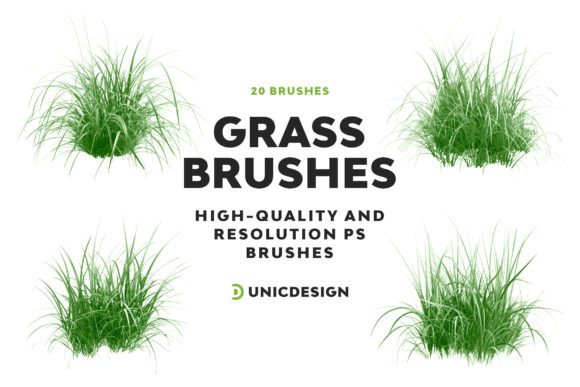
This specific collection offers a high-quality set of 20 unique grass brushes designed to breathe life into your digital landscapes with a single stroke. Crafted with impeccable detail and resolution reaching up to 2000px, these tools recreate the lush texture of grass right within your creative projects. Whether you are a seasoned graphic designer or a hobbyist just starting to explore digital art, having access to realistic textures can transform the mood and depth of your work instantly.
The Practical Power of High-Resolution Textures
When we talk about digital assets, resolution is often overlooked until it becomes a problem. If you zoom in on a low-quality brush, the edges become jagged, and the texture loses its realism. The Grass Photoshop Brushes bundle addresses this directly by offering files with resolutions up to 2000px. Why does this matter? It matters because modern screens are sharper than ever, and print media demands crisp details.
Imagine you are designing a large banner for an outdoor event or a poster for a nature retreat. You apply a grassy foreground to ground the composition. With standard, lower-resolution brushes, the grass might look pixelated when printed at a large size. With these high-definition brushes, the texture holds up under scrutiny. Each blade retains its definition, allowing you to scale your artwork up without worrying about degradation. This level of detail ensures that your final output looks professional, regardless of the medium.
Real-World Scenarios: Where These Brushes Shine
The versatility of this bundle means it isn't limited to just one type of project. The 20 distinct versions included ensure you have the right tool for varied design needs. Let's look at how different professionals and hobbyists can utilize these resources in their daily workflows.
For Landscape Architects and Environmental Designers
Professionals in architecture and urban planning often need to present concepts to clients who may not visualize a 3D model immediately. A quick rendering with realistic vegetation can make a proposal much more compelling. Instead of spending hours modeling every patch of turf, these designers can use the Grass Photoshop Brushes to add realistic foreground elements to their blueprints. The variety in the pack allows them to choose between manicured lawn textures for a park bench area or wilder, untamed grass for a meadow concept. This speeds up the presentation process significantly while maintaining visual fidelity.
For Game Developers and Concept Artists
In the gaming industry, environment artists spend countless hours creating immersive worlds. While 3D engines handle the bulk of the terrain, 2D overlays and concept art still rely heavily on texture brushes. A concept artist sketching out a new level for a fantasy RPG can use these brushes to quickly establish the terrain type. One stroke can define the edge of a forest or the path through a field. The ability to layer different grass types from the 20 available options helps create depth, distinguishing between the grass in the immediate foreground and the blurred vegetation in the distance.
For Social Media Marketers and Content Creators
Marketers and bloggers often need fresh visuals to accompany articles about travel, gardening, or lifestyle topics. Stock photos are great, but sometimes they lack the specific aesthetic needed to match a brand's color palette or message. By using these brushes, a content creator can take a simple photo of a product—say, a pair of hiking boots—and composite it onto a custom-made grassy background. This creates a unique, cohesive image that stands out in a crowded social media feed. The ease of application means you can produce high-quality graphics in minutes rather than hours.
Simplicity Meets Professional Results
One of the biggest barriers to using advanced digital tools is the learning curve. Many users avoid complex assets because they fear the setup will be difficult or incompatible with their software. This bundle removes those hurdles. Usage is a breeze, thanks to an included Readme file that efficiently guides you through the setup process. You don't need to be a technical wizard to get started; the instructions are straightforward, ensuring you can import the brushes and start painting almost immediately.
Furthermore, compatibility is a major concern for anyone working in a team or across different machines. This collection boasts robust compatibility across numerous Photoshop versions, including CS6, CC, and all yearly updates from 2015.5 through 2022 and beyond. Whether you are running an older version of the software on a legacy machine or the latest update on a high-end workstation, these brushes will function seamlessly. This consistency is crucial for freelancers who might switch between client computers or agencies with mixed hardware setups.
Considering Your Needs Before You Download
While these brushes are powerful, it is important to consider how they fit into your specific workflow before downloading. First, assess the style of your project. If you are aiming for a hyper-realistic photomontage, the high resolution of these brushes will be essential. However, if you are creating a stylized, cartoonish illustration, you might find the realism too intense unless you adjust the opacity or blending modes in Photoshop.
Secondly, think about your storage and organization. Since this is a collection of 20 distinct brushes, keeping your workspace organized is key. Take advantage of the Readme file not just for installation, but for understanding how to categorize the brushes within your own preset library. Naming them according to their specific texture (e.g., "Tall Wild Grass," "Short Lawn," "Wet Meadow") can save you time later when you are rushing to finish a deadline.
Finally, remember that a brush is only as good as the hand guiding it. While the Grass Photoshop Brushes provide the texture, your artistic touch determines the placement and flow. Practice varying your pressure sensitivity if you have a tablet, and experiment with different brush sizes to mimic the perspective of your scene. The goal is to integrate the texture so naturally that the viewer doesn't realize it was added digitally.
Support That Goes Beyond the Download
Purchasing digital assets can sometimes feel isolating. You download the file, try to install it, encounter an error, and then have no one to ask for help. This bundle changes that dynamic. The cherry on top is that this collection comes with around-the-clock unlimited support accessible via the link in the Readme file.
This level of support is rare in the world of digital downloads. Whether you need assistance with a UnicDesign product specifically, have questions about compatibility with a niche version of Photoshop, or simply want advice on how to achieve a certain effect, the support team is there to help. Knowing that you aren't left in the dark when it comes to perfecting your crafts provides peace of mind. It transforms a simple transaction into a partnership, ensuring that you can maximize the potential of the tools you've acquired.
Final Thoughts on Elevating Your Art
In a digital landscape saturated with generic templates and low-effort graphics, the choice of tools defines the quality of your output. Grass Photoshop Brushes offer a bridge between the mundane and the magnificent. They allow you to inject organic life into your static images, creating scenes that resonate with viewers on a sensory level.
From the architectural renderings that sell properties to the game environments that transport players to new worlds, the impact of a well-placed texture cannot be overstated. With 20 unique variations, high-resolution clarity, broad software compatibility, and dedicated support, this bundle is more than just a file download; it is a resource that empowers creators to work faster and better. Whether you are a professional looking to streamline your pipeline or an enthusiast eager to improve your digital paintings, these brushes provide the foundation for lush, vibrant, and believable landscapes.