Mastering Atmospheric Effects with the 25 Smoke Photoshop Abr Brushes Set
In the realm of digital art and graphic design, the ability to manipulate light and texture often defines the difference between a flat image and a compelling visual story. Among the most versatile tools for creating depth, mystery, and drama are smoke effects. Whether you are designing a movie poster, enhancing a product photograph, or creating abstract backgrounds, the right texture can transform your project. This is where the 25 Smoke Photoshop Abr Brushes Set becomes an indispensable asset for creatives looking to elevate their workflow without spending hours painting every wisp from scratch.
The Power of Realistic Smoke in Digital Design
Smoke is more than just a visual element; it is an atmospheric agent that guides the viewer's eye and sets the mood. It can suggest danger, romance, mystery, or industrial grit depending on how it is applied. However, creating realistic smoke manually in Adobe Photoshop is a time-consuming process that requires a deep understanding of opacity, flow, and blending modes. This is why high-quality brush presets have become a standard in modern creative workflows.
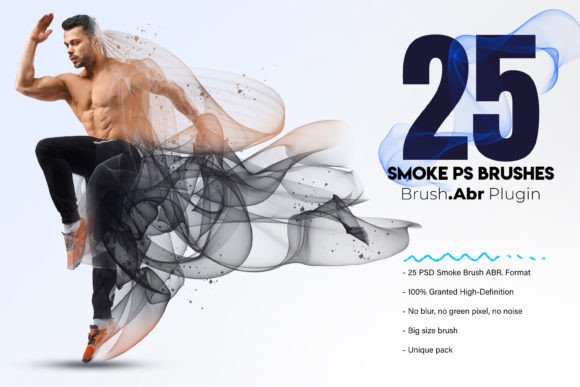
The 25 Smoke Photoshop Abr Brushes Set offers a curated collection of naturally shaped smoke brushes designed to mimic the organic behavior of real smoke. Unlike generic filters that often look artificial or repetitive, these brushes are hand-painted, ensuring that each stroke carries a unique character. When you download this pack, you are not just getting a set of shapes; you are gaining access to a library of textures that behave like actual vapor, allowing for seamless integration into complex compositions.
Why Hand-Painted Brushes Make a Difference
One of the primary reasons designers seek out specific resources like the 25 Smoke Photoshop Abr Brushes Set is the quality of the source material. Many free brush packs available online suffer from low resolution, visible pixelation, or unnatural edges. These flaws become glaringly obvious when the artwork is zoomed in or printed at large sizes.
This particular set addresses those common pain points directly. Each brush in the collection is rendered at a massive 3000×2000 pixels in size. This high-definition format ensures that no matter how much you scale your canvas, the smoke retains its crispness and detail. There is no blur, no green pixel artifacts, and no noise that could ruin the integrity of your final render. The "no blur" characteristic is particularly vital for professional work, as it allows artists to control the softness through layer settings rather than relying on pre-applied blurring within the brush itself.
Technical Specifications and Workflow Integration
Integrating new assets into an existing design pipeline should be effortless. The 25 Smoke Photoshop Abr Brushes Set comes in the standard .ABR format, which is natively supported by Adobe Photoshop. This means installation is a straightforward process: simply double-click the file or load it via the Brush Preset panel, and the brushes are ready to use immediately.
Once installed, the versatility of these brushes becomes apparent. They are designed to be used exclusively for standalone smoke elements or stacked on top of one another to create dense, volumetric clouds. This stacking capability is a game-changer for advanced users. By varying the opacity and flow of different brushes within the set, you can build up layers of smoke that interact realistically with light sources in your scene.
- High-Definition Quality: With 100% granted high-definition status, these brushes are suitable for both web graphics and large-format printing.
- Unique Shapes: The pack contains 25 distinct variations, ranging from thin wisps to thick billows, providing a comprehensive toolkit for any scenario.
- Scalability: The large base size (3000x2000px) ensures that resizing does not degrade the image quality.
- Clean Edges: Free from compression artifacts, ensuring smooth gradients and transitions.
Practical Applications Across Industries
The utility of the 25 Smoke Photoshop Abr Brushes Set extends far beyond simple artistic expression. In the commercial sector, these brushes are frequently used in advertising to add a sense of luxury or intrigue. For instance, a perfume advertisement might use a delicate wisp of smoke to suggest elegance, while an automotive ad might employ thicker, darker smoke to imply power and speed.
In the gaming industry, concept artists rely heavily on such assets to quickly prototype environments. Creating foggy forests, volcanic landscapes, or magical spell effects requires rapid iteration. Having a pack of 25 high-quality smoke brushes allows artists to sketch out atmospheres in minutes rather than hours. Similarly, in book cover design, smoke is a staple for genres like fantasy, thriller, and horror. The ability to stack these brushes allows designers to create depth, making characters appear as if they are emerging from the mist or hiding within it.
Photographers also benefit significantly from this resource. Post-processing often involves adding atmospheric elements to enhance the narrative of a photo. A landscape shot taken on a clear day can be transformed into a moody, ethereal masterpiece by overlaying smoke from the 25 Smoke Photoshop Abr Brushes Set. Because the brushes are naturally shaped, they blend seamlessly with the lighting conditions of the original photograph, avoiding the "sticker-like" appearance common with lower-quality assets.
Mastering the Art of Stacking and Blending
To truly leverage the potential of the 25 Smoke Photoshop Abr Brushes Set, understanding how to manipulate the brushes is key. While the brushes themselves are high quality, the magic happens in how they are applied. One of the most effective techniques is stacking. By selecting different brushes from the pack and applying them on separate layers, you can control the density and direction of the smoke flow.
Start with a larger, softer brush to lay down the base volume of the smoke. Then, switch to a finer brush to add intricate details and tendrils. Adjusting the blending mode of these layers to "Screen," "Overlay," or "Soft Light" can dramatically change how the smoke interacts with the background. For example, using "Screen" will make the smoke glow against dark backgrounds, perfect for fire or neon-lit scenes, while "Multiply" works well for darkening areas to create shadowy depths.
Furthermore, the lack of inherent blur in these brushes gives you total control over the focus. You can apply a Gaussian Blur filter to specific layers to simulate smoke that is further away in the distance, adhering to the principles of atmospheric perspective. This level of control is what separates amateur edits from professional-grade compositing.
Considerations Before Adopting New Assets
When choosing digital assets, creators often weigh several factors. Price is a consideration, but so is compatibility and quality assurance. Many users hesitate to download brush packs due to fears of malware or poor quality. The 25 Smoke Photoshop Abr Brushes Set stands out because it prioritizes user experience and technical excellence. The promise of "no green pixel, no noise" is a significant relief for professionals who cannot afford to spend time cleaning up assets before using them.
Another factor is the uniqueness of the pack. Generic brushes often result in designs that look identical to others found online. Since this set features hand-painted, unique shapes, it helps ensure that your final design maintains its originality. This is crucial in a saturated market where standing out visually is paramount.
Ultimately, the decision to use a specialized tool like this comes down to efficiency and quality. If you find yourself constantly struggling to paint smoke or searching for better alternatives, investing time in learning how to utilize the 25 Smoke Photoshop Abr Brushes Set can streamline your process and improve the overall polish of your work.
Final Thoughts on Creative Enhancement
Digital art is an evolving craft, and having the right tools makes all the difference. The 25 Smoke Photoshop Abr Brushes Set represents a significant step forward for anyone looking to incorporate realistic atmospheric effects into their projects. With its high resolution, clean rendering, and versatile application methods, it serves as a robust foundation for everything from casual hobbyists to seasoned professionals.
By integrating these brushes into your workflow, you unlock the ability to create dynamic, layered compositions that capture the imagination. Whether you are building a world for a novel, designing a brand identity, or simply experimenting with new styles, the natural flow and high definition of these brushes provide the flexibility needed to bring your vision to life. Remember, the best designs often come from combining high-quality assets with creative experimentation, and this pack offers exactly that opportunity.