Smoke Bomb Brushes for Photoshop
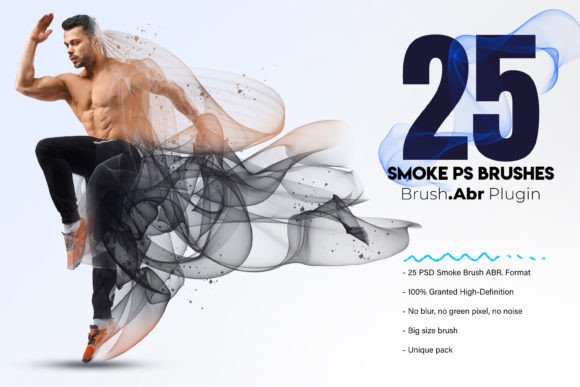
Digital art often struggles with the intangible. While textures of wood, metal, and fabric are easy to replicate, capturing the ephemeral nature of smoke requires a delicate touch. It needs movement, opacity shifts, and a sense of weightlessness that standard airbrush tools rarely achieve on their own. This is where Smoke Bomb Brushes for Photoshop transform the workflow. These aren't just generic smudge tools; they are a meticulously crafted assembly designed to inject strikingly realistic smoke effects into your artwork instantly.
For professional artists, photographers, and enthusiasts alike, the ability to manipulate atmosphere can be the difference between a good image and a memorable one. Whether you are trying to transport an audience into a hazy, mysterious landscape or amplify the allure of a high-fashion portrait, these brushes offer a myriad of applications across various projects. They empower you to let your creativity soar without getting bogged down in complex node-based simulations or hours of manual painting.
The Anatomy of Realistic Smoke
What makes this specific set stand out is the attention to detail in its construction. Many free brush packs rely on low-resolution scans that pixelate when scaled up, breaking the illusion of reality. In contrast, the Smoke Bomb Brushes are precision-crafted for top-tier quality. Each brush tip is rendered at a high resolution ranging from 2500 to 5000 pixels. This ensures that whether you are working on a small social media graphic or a massive billboard-sized print, the edges remain soft and organic, never jagged or aliased.
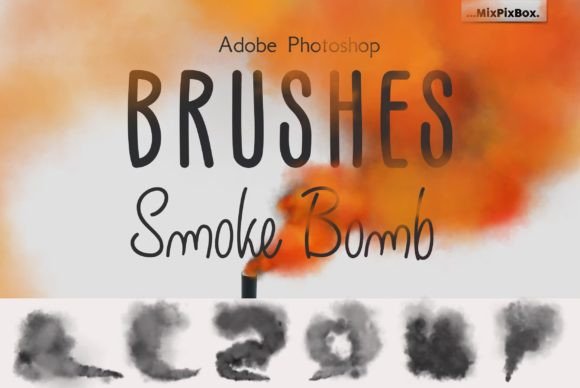
The collection boasts 32 distinct ABR files. This includes one versatile free-form brush for general atmospheric haze and 31 specialized smoke bomb shape brushes. These shapes capture different stages of a smoke explosion: the initial dense burst, the rising column, the dissipating wisps, and the heavy, rolling clouds. This variety allows for flexible aesthetic choices, enabling you to build complex scenes layer by layer rather than relying on a single repetitive texture.
Elevating Portraiture and Fashion
One of the most compelling uses for these brushes is in portraiture and fashion photography. A plain background can sometimes feel sterile, but introducing a subtle veil of smoke adds depth and drama without distracting from the subject. When working with portraits, the goal is usually to frame the face or add a mood of mystery.
To achieve this, start by creating a new layer above your base image. Select a lighter, more diffuse brush from the set and choose a color that complements your lighting scheme—often a cool blue or a warm amber depending on the scene. Paint gently around the edges of the subject. The high-resolution tips allow you to control the density perfectly, ensuring the smoke looks like it is interacting with the light source rather than sitting flat on top of the photo. This technique amplifies the allure of the portrait, turning a standard headshot into a cinematic character study.
Practical Tips for Portrait Integration
- Blending Modes: Switch your smoke layer to "Screen" or "Overlay" to integrate it naturally with the existing highlights.
- Color Grading: Use the Hue/Saturation adjustment on the smoke layer to match the ambient temperature of your photograph.
- Opacity Control: Keep the flow low (around 10-20%) to build up the effect gradually, avoiding harsh, solid blocks of color.
Landscape and Abstract Exploration
Beyond portraiture, these brushes open up vast possibilities for landscape and abstract design. In landscape photography, smoke can suggest early morning fog, the aftermath of a storm, or the mystical quality of a forest clearing. By using the denser "bomb" shapes, you can create focal points that draw the viewer's eye through the composition, guiding them from the foreground to the distant horizon.
For abstract creators, the 31 smoke shapes serve as dynamic building blocks. You can overlap them in vibrant colors to create fluid, energetic compositions that mimic the chaos of a chemical reaction or the serenity of drifting clouds. The simple navigation and usage make it a joy to incorporate into these experimental designs. Because the brushes are compatible with all current Adobe Photoshop versions, you don't need to worry about version conflicts slowing down your creative flow.
Workflow Efficiency for Professionals
Time is a critical resource for freelancers, marketers, and small business owners. Creating custom smoke effects from scratch using the Smudge tool or Liquify filter can take minutes per stroke, adding up to hours over a project. The Smoke Bomb Brushes for Photoshop streamline this process significantly. With simple navigation, you can access the exact shape you need with a single click.
This efficiency is particularly valuable for content creators who need to produce high-quality visuals for blogs, social media, or advertising campaigns on tight deadlines. Imagine needing to create a series of five promotional images for a product launch. Instead of spending days perfecting atmospheric effects, you can apply these brushes to establish a consistent visual theme across all assets in a fraction of the time. This consistency helps build a recognizable brand identity while maintaining a high standard of artistic prowess.
Adapting for Different Audiences and Platforms
The versatility of these brushes extends to how different users adapt them for specific goals. An educator might use them to demonstrate concepts of light and shadow in digital art classes, showing students how to manipulate opacity and blending modes. A blogger could use them to create unique header images that stand out in a crowded feed. Entrepreneurs might apply them to mockups to give their product renders a premium, polished look before presenting them to investors.
When adapting these effects for different platforms, consider the context. For mobile-first content, keep the smoke effects cleaner and less cluttered to ensure readability. For large-format prints or desktop wallpapers, feel free to utilize the full range of the 5000-pixel resolution brushes to explore intricate details. The key is to balance inspiration with practical guidance; the smoke should enhance the message, not obscure it.
Maintaining Clarity and Consistency
While the freedom to create is exciting, it is important to keep results clear and effective. Overusing smoke effects can lead to muddy, confusing imagery where the subject gets lost in the haze. To avoid this, treat the smoke as a supporting actor, not the lead. Use it to define space, separate layers, or direct attention.
Organization is also key. Since the pack includes 32 brushes, it helps to organize your workspace. Create a custom preset group in Photoshop labeled "Atmosphere" or "Smoke Effects" so you can quickly toggle between the free-form brush and the specific shapes. This keeps your workflow organized and ensures you can find the right tool when inspiration strikes. By maintaining a structured approach, you ensure that every project remains original and audience-friendly, regardless of the complexity of the effects used.
Ultimately, these tools are about expanding your creative vocabulary. They provide the raw materials to tell richer stories through your digital designs. Whether you are a seasoned pro looking to refine your signature style or a hobbyist eager to experiment with new techniques, the Smoke Bomb Brushes for Photoshop offer a reliable, high-quality solution to bring your vision to life. Let your creativity soar and enchant your audience with work that feels alive, breathing, and undeniably real.